SMARTPHONE MD 96580 - Smartphone MEDION - Free user manual and instructions
Find the device manual for free SMARTPHONE MD 96580 MEDION in PDF.


User questions about SMARTPHONE MD 96580 MEDION
0 question about this device. Answer the ones you know or ask your own.
Ask a new question about this device
Download the instructions for your Smartphone in PDF format for free! Find your manual SMARTPHONE MD 96580 - MEDION and take your electronic device back in hand. On this page are published all the documents necessary for the use of your device. SMARTPHONE MD 96580 by MEDION.
USER MANUAL SMARTPHONE MD 96580 MEDION
Installing the battery. 9
Installing a memory card and the SIM card 11
Charging the battery. 13
Turning your phone on/off 14
Power on 14
Power off 15
Using your Phone 16
Keypad shortcuts 16
Instandbymode. 16
*&#keyfunctionlist. 17
Basic functions 18oring a phonebook entry 24
Storing a phonebook entry from the menu. 24
Storing a phonebook entry in standby mode 24
Searching for a phonebook entry 25
Send data using Bluetooth technology 26
Pairing 26
Visibility 27
Rename 28
Service List. 28
Delete devices 29
Download data with Bluetooth technology. 29
Send data with Bluetooth technology 30
Security 30
Select default save location 30
Select prefer player 31
Adjust microphone volume. 31
Send phone book entries 32
Send a phone book entry. 32
Send my business card. 32
Exchange business card 33
Connecting a headset 33
For your safety. 34
Playing Music 18honebook entry from the menu. 24
Storing a phonebook entry in standby mode 24
Searching for a phonebook entry 25
Send data using Bluetooth technology 26
Pairing 26
Visibility 27
Rename 28
Service List. 28
Delete devices 29
Download data with Bluetooth technology. 29
Send data with Bluetooth technology 30
Security 30
Select default save location 30
Select prefer player 31
Adjust microphone volume. 31
Send phone book entries 32
Send a phone book entry. 32
Send my business card. 32
Exchange business card 33
Connecting a headset 33
For your safety. 34
Listening to the Radio 18onebook entry in standby mode 24
Searching for a phonebook entry 25
Send data using Bluetooth technology 26
Pairing 26
Visibility 27
Rename 28
Service List. 28
Delete devices 29
Download data with Bluetooth technology. 29
Send data with Bluetooth technology 30
Security 30
Select default save location 30
Select prefer player 31
Adjust microphone volume. 31
Send phone book entries 32
Send a phone book entry. 32
Send my business card. 32
Exchange business card 33
Connecting a headset 33
For your safety. 34
Playing Music 18honebook entry from the menu. 24
Storing a phonebook entry in standby mode 24
Searching for a phonebook entry 25
Send data using Bluetooth technology 26
Pairing 26
Visibility 27
Rename 28
Service List. 28
Delete devices 29
Download data with Bluetooth technology. 29
Send data with Bluetooth technology 30
Security 30
Select default save location 30
Select prefer player 31
Adjust microphone volume. 31
Send phone book entries 32
Send a phone book entry. 32
Send my business card. 32
Exchange business card 33
Connecting a headset 33
For your safety. 34
Listening to the Radio 18onebook entry in standby mode 24
Searching for a phonebook entry 25
Send data using Bluetooth technology 26
Pairing 26
Visibility 27
Rename 28
Service List. 28
Delete devices 29
Download data with Bluetooth technology. 29
Send data with Bluetooth technology 30
Security 30
Select default save location 30
Select prefer player 31
Adjust microphone volume. 31
Send phone book entries 32
Send a phone book entry. 32
Send my business card. 32
Exchange business card 33
Connecting a headset 33
For your safety. 34
Listening to the Radio 18onebook entry in standby mode 24
Searching for a phonebook entry 25
Send data using Bluetooth technology 26
Pairing 26
Visibility 27
Rename 28
Service List. 28
Delete devices 29
Download data with Bluetooth technology. 29
Send data with Bluetooth technology 30
Security 30
Select default save location 30
Select prefer player 31
Adjust microphone volume. 31
Send phone book entries 32
Send a phone book entry. 32
Send my business card. 32
Exchange business card 33
Connecting a headset 33
For your safety. 34
Making a call. 18
Answering or rejecting a call 19
Turning off the Speaker. 19
Adjusting Volume During a call 19
Redialing a number 19
Main menu 20elete devices 29
Download data with Bluetooth technology. 29
Send data with Bluetooth technology 30
Security 30
Select default save location 30
Select prefer player 31
Adjust microphone volume. 31
Send phone book entries 32
Send a phone book entry. 32
Send my business card. 32
Exchange business card 33
Connecting a headset 33
For your safety. 34
Setting up Time & Date 23
Setting time 23
Setting date 23
Setting date format. 23
Storing a phonebook entry 24
Storing a phonebook entry from the menu. 24
Storing a phonebook entry in standby mode 24
Searching for a phonebook entry 25
Send data using Bluetooth technology 26
Pairing 26
Visibility 27
Rename 28
Service List. 28
Delete devices 29
Download data with Bluetooth technology. 29
Send data with Bluetooth technology 30
Security 30
Select default save location 30
Select prefer player 31
Adjust microphone volume. 31
Send phone book entries 32
Send a phone book entry. 32
Send my business card. 32
Exchange business card 33
Connecting a headset 33
For your safety. 34
Your handsetull, Low battery, Low battery warning
Message inboxfull
New message. The icon disappears after the new messages are read.
Silence mode. In standby, press and hold # key to turn on or off the speaker.
Roam indicator.
Alarm on. The icon disappears after the alarms are turned off.
Vibration on.
Earphone is connected and detected.
Airplane mode
Call forward
Call history
Keypad unlocked
Keypad locked
Voicemail indicator.
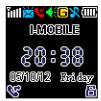
Standby mode

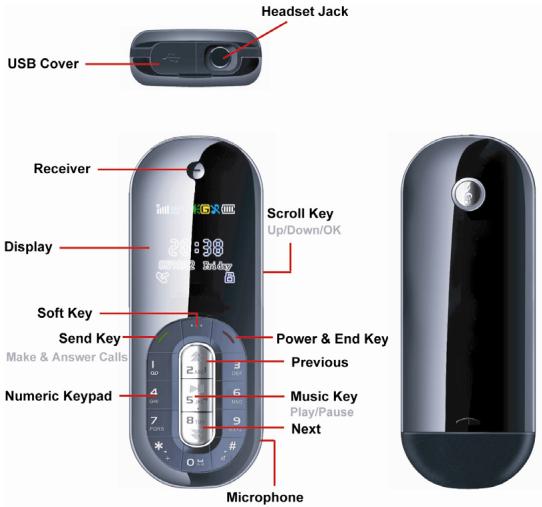
Main menu (FM Radio)